
Understanding How To Choose an SEO Plugin That Helps You Rank
Dive Into Our Podcast
What an SEO plugin really does
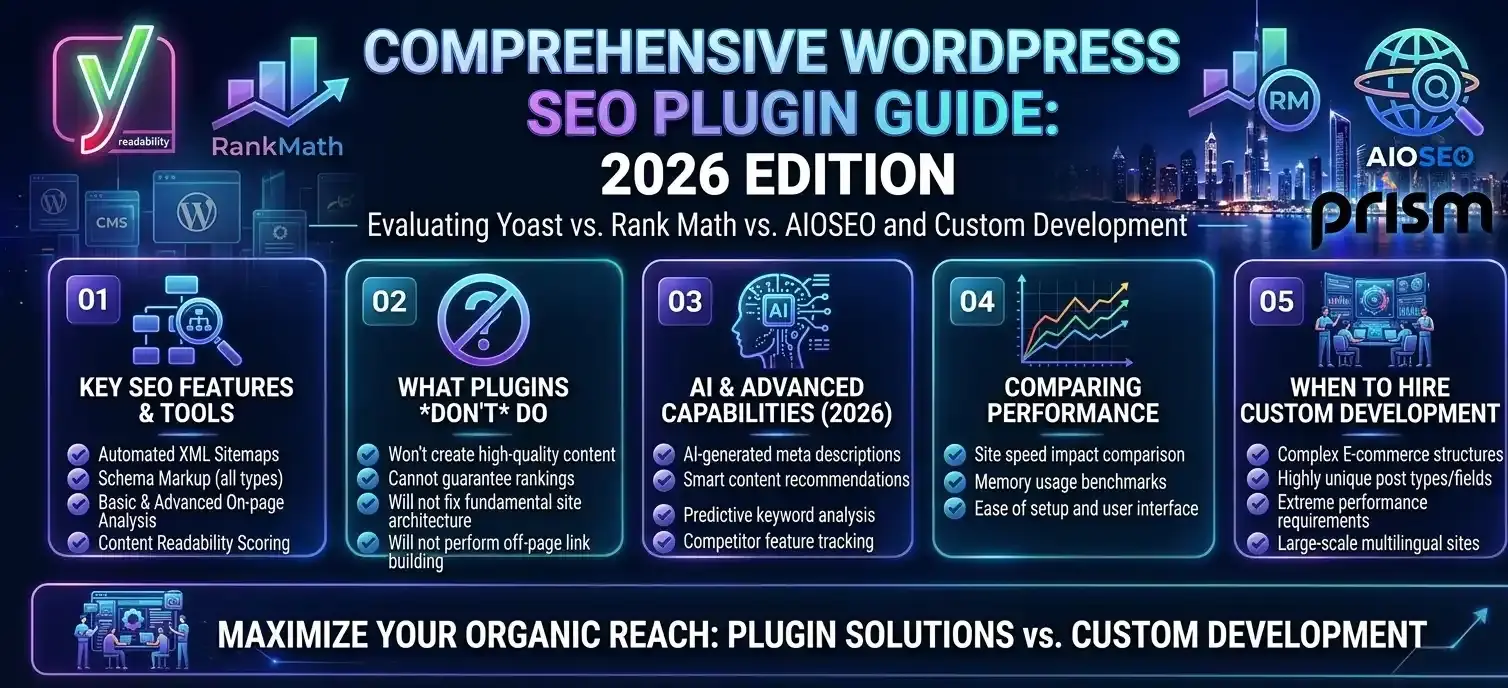
A plugin is a tool you use for SEO optimization. This is not a strategy or planning. Use it to edit page titles and Meta summaries. It can also assist you in creating an XML sitemap. You can add schema tags with less effort. It makes canonical links easier to set. You can also handle redirects through it. You do this without editing code. Many tools let you add schema markup. You can set canonical tags and handle redirects too, all without editing code. Some plugins will also judge your text based on a focus keyword.
Still, it will not pick good keywords for you. It will not write content that people actually find helpful. It will not win links from other sites. And it will not fix a slow site just by itself. Those still depend on people and infrastructure. As our on-page SEO team often reminds clients, a green traffic light in a plugin is not a ranking.
The three plugins worth shortlisting
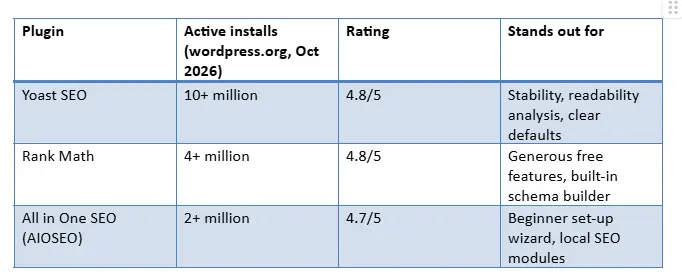
All three below have capable free versions, active development and millions of sites behind them.
Yoast SEO
Yoast is the safe pick. It comes with smart default values, updates rarely break sites, and its readability tests are wonderful if you’re on a team that does plenty of blogging. Premium features include internal linking suggestions, redirect management, and more.
Rank Math
Rank Math includes a lot in the free plan. You get more than just basics, like more than one focus keyword, a schema setup tool, and a 404 check feature. That generosity is both its strength and risk: switch on every module and you add needless weight. Enable only what you’re going to use.
All in One SEO
AIOSEO is perfect for owners who want a guided set-up process and powerful, accurate local business schema which is great for clinics, restaurants and retailers with a focus on specific emirates.
The supporting plugins people forget
An SEO plugin handles metadata, but rankings also depend on speed and site health. To properly SEO your website, pair it with:
- A caching and performance plugin to improve load times and Core Web Vitals.
- An image compression tool that serves WebP or AVIF files.
- A security plugin, because a hacked site loses rankings fast. Our guide to securing WordPress against attacks explains why.
- If your website supports business operations, a free invoice generator can simplify invoice creation and help you manage billing documents without installing additional website extensions.
Don’t enable two SEO plugins together. They can write the same Meta data in different ways. They may also add schema twice. That mix can throw off search engines.
What about Shopify or Wix?
On hosted sites, you usually get the basics without extra tools. Titles can be edited. Sitemaps are often included. Simple structured data may already be there. On Shopify, more detailed schema and image related features usually come from extra apps. Wix tends to keep more of it inside the platform settings. You still need to set it the correct way. If you use the right rich snippet markup, you can show more info in the search results. That can also give you a bit more room on the page.
When plugins hit their limits
Plugins struggle with heavy page builders, complex multilingual set-ups and unique templates. That is when a custom WordPress development companyearns its fee, building lean themes where SEO is baked into the code rather than bolted on. A full-service website development companycan also pair the build with reliable web hosting, which matters just as much for speed.
If you are weighing up a rebuild, start with our guide to making a site both SEO- and user-friendly
FAQ's
What is the best SEO plugin you would recommend for WordPress?
For most websites, Yoast SEO or Rank Math will do Yoast is for those who value stability and Rank math is for this who want more free features.
Do SEO plugins slow down a website?
Lightly, if configured well. Problems come from enabling every module or stacking several plugins that do the same job.
Can I use a free invoice generator alongside my WordPress SEO plugin?
Yes. A free invoice generator is a separate business tool that helps you create invoices, while an SEO plugin manages metadata, sitemaps, and other optimization settings. You can use both without creating conflicts, provided they do not duplicate the same website functionality.
Can I use Yoast and Rank Math together?
No. Having both will cause double Meta tags, but also conflicting schema. Select one of them plugin. Then transfer your settings over.
Will an SEO plugin guarantee I’m page 1 rank?
No. These products serve as assistance with certain technical aspects. Still, your rank is based on your content and your internal and external links and how fast the site loads. For a comprehensive SEO optimization package, get in touch with the Prism Digital team.

About The Author: Lovetto Nazareth
Lovetto Nazareth is the Founder & CEO of Prism Digital, a Dubai-based digital marketing and advertising agency he started nearly two decades ago from a laptop and a vision, as he puts it, to one of the region's established full-service agencies spanning SEO, PPC, social media, web design, and PR.
Over more than 19 years in advertising and digital marketing, Lovetto has guided thousands of campaigns across the UAE and GCC, working across sectors from real estate to hospitality to fintech. He writes and speaks on digital transformation and marketing strategy, and has contributed opinion pieces to Campaign Middle East, one of the region's leading marketing trade publications.
He takes a data-first approach to growth testing, measuring, and iterating rather than relying on guesswork and outside of work he's an adventure sports enthusiast and a singer-songwriter.